
认识下_split切分分片
**场景为:**你原始有一个比如指定3个分片的索引,后续需要扩展更多分片针对一个索引,此时我们就需要进行split切分。
Elasticsearch 的 _split API 是一种高效的分片扩容机制,它允许将现有索引的每个主分片"拆分"成多个更小的分片,从而创建出一个拥有更多主分片的新索引。这种方法特别适用于需要提升索引写入和查询性能的场景。
分片扩展介绍
扩容实现方式
| 方案 | 核心方法 | 适用场景 | 关键约束 |
|---|---|---|---|
| 分片拆分 (Split) | 使用 _split API 将原索引的每个分片拆分成多个,生成一个新索引。 |
需要增加主分片数量,且对速度要求较高。 | 新分片数必须是原分片数的整数倍。 |
| 重建索引 (Reindex) | 创建一个拥有更多主分片的新索引,然后使用 _reindex API 将数据从旧索引迁移过来。 |
需要增加主分片数量,并且可能需要同时修改字段映射(mappings)。 | 对集群资源消耗大,速度较慢。 |
| 增加副本 (Replica) | 动态调整现有索引的 number_of_replicas 设置。 |
需要提升搜索查询的吞吐量和集群的容错能力。 | 无法增加主分片数量,只增加副本分片。 |
| 水平扩容 (Scale Out) | 向集群中添加更多的数据节点。 | 通过提升硬件资源来分散负载,提高整体性能。 | 无法增加主分片数量,但可以使现有分片更均匀地分布。 |
number_of_routing_shards参数
number_of_routing_shards 参数的主要作用是 为索引未来的分片拆分(Shard Splitting)预留扩容空间。它定义了用于文档路由的哈希空间大小。在较新的 Elasticsearch 版本(7.x 及以后)中,通常你不需要手动设置它,因为其默认行为已变得更智能。下面这个表格能帮你快速了解其核心信息:
| 特性 | 说明 |
|---|---|
| 主要作用 | 定义路由哈希空间,允许通过 _split API 将来增加主分片数量。 |
| 默认值 | 通常默认为 number_of_shards,在 7.x 及以后版本中系统会自动管理。 |
| 关键限制 | 索引创建后不可更改。 |
| 使用场景 | 计划未来对索引进行分片拆分。 |
举例:
{
  "number_of_shards": 3,           // 3个实际书库
  "number_of_routing_shards": 12   // 12个虚拟区域
}
存放规则:
虚拟区域 → 实际书库
1,2,3,4区  → A书库
5,6,7,8区  → B书库
9,10,11,12区 → C书库
为什么需要该参数?
如果没有 number_of_routing_shards=12:
- 只有3个虚拟区域(1,2,3)
- 想拆分成6个书库时:
3 ÷ 6 = 0.5❌ 无法均匀分配 - 根本无法拆分!
有 number_of_routing_shards=12:
- 有12个虚拟区域
- 拆分成6个书库:
12 ÷ 6 = 2✅ 每个书库分到2个区域 - 可以完美拆分
另一个角度:哈希桶
把 number_of_routing_shards 想象成哈希桶的数量:
初始:12个桶 → 3个分片
桶分布:[1,2,3,4] [5,6,7,8] [9,10,11,12]

拆分后:12个桶 → 6个分片
桶分布:[1,2] [3,4] [5,6] [7,8] [9,10] [11,12]
可最后,如果是默认的话,es如何进行管理呢?
- 参考官方文档:https://elastic.ac.cn/guide/en/elasticsearch/reference/current/indices-split-index.html 包含拆分过程
在 Elasticsearch 8.x 中,number_of_routing_shards 是一个关键的静态索引设置,它决定了索引未来通过 split API 进行拆分的潜力。理解其默认行为和拆分规则,对于合理规划索引生命周期至关重要。
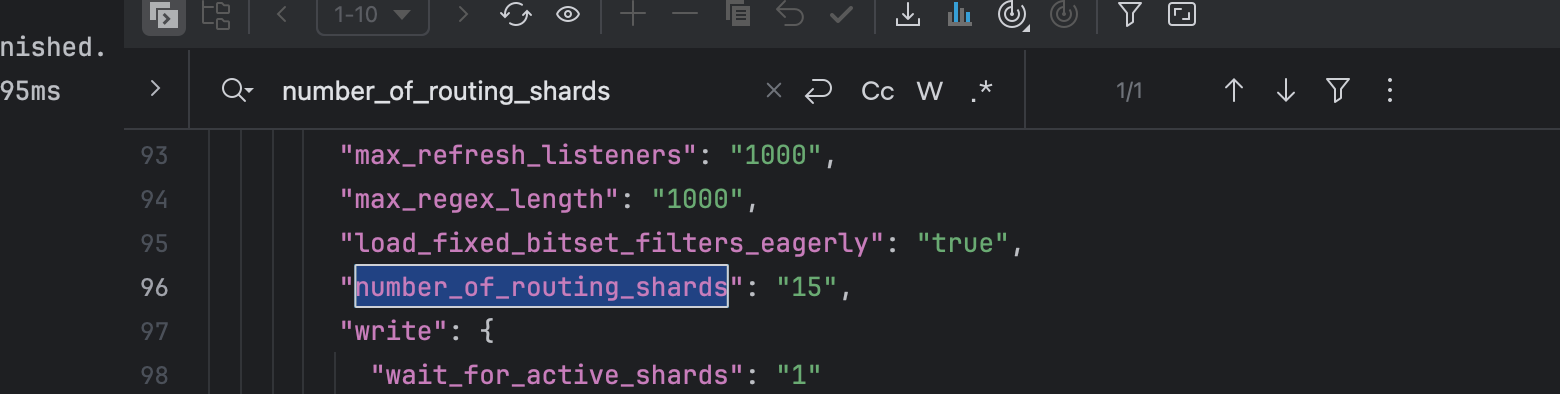
在 Elasticsearch 7.0 及更高版本(包括 8.x)中,如果在创建索引时没有显式指定 index.number_of_routing_shards 参数,其默认值并非一个固定的数字,而是根据索引的主分片数(index.number_of_shards)自动计算得出的。
这个默认值的设计旨在支持一种特定的拆分模式:允许您将索引的主分片数按 2 的幂次方 进行扩展。例如,如果初始主分片数为 1,理论上可以拆分为 2、4、8、16……直到达到上限 1024。
默认可通过参数查看:
GET /file_document/_settings?include_defaults=true
分片切分实战案例
说明:如有历史索引为/file_document,1分片。同时设置别名映射 my_search_file_document 映射到 file_document。
后续需要扩展3分片,可使用split接口来对file_document 迁移到 file_document_v1。
未来请求都是基于别名 my_search_file_document 即可。
1、创建索引(固定1分片)
初步创建一个
PUT /file_document
{
  "settings": {
    "number_of_shards": 1,
    "number_of_replicas": 1,
    "refresh_interval": "1s",
    "analysis": {
      "analyzer": {
        "path_analyzer": {
          "type": "custom",
          "tokenizer": "path_tokenizer"
        }
      },
      "tokenizer": {
        "path_tokenizer": {
          "type": "path_hierarchy"
        }
      }
    }
  },
  "mappings": {
    "properties": {
      "id": {
        "type": "keyword"
      },
      "fileName": {
        "type": "text",
        "analyzer": "ik_max_word",
        "search_analyzer": "ik_smart",
        "fields": {
          "keyword": {
            "type": "keyword",
            "ignore_above": 256
          },
          "raw": {
            "type": "text",
            "analyzer": "standard"
          }
        }
      },
      "fileContent": {
        "type": "text",
        "analyzer": "ik_max_word",
        "search_analyzer": "ik_smart"
      },
      "fileType": {
        "type": "keyword"
      },
      "filePath": {
        "type": "text",
        "analyzer": "path_analyzer",
        "fields": {
          "keyword": {
            "type": "keyword"
          }
        }
      },
      "fileSize": {
        "type": "float"
      },
      "createUserId": {
        "type": "keyword"
      },
      "catalogStatus": {
        "type": "integer"
      },
      "tags": {
        "type": "keyword",
        "fields": {
          "text": {
            "type": "text",
            "analyzer": "ik_smart"
          }
        }
      },
      "catalogNames": {
        "type": "keyword",
        "fields": {
          "text": {
            "type": "text",
            "analyzer": "ik_smart"
          }
        }
      },
      "catalogFields": {
        "type": "keyword",
        "fields": {
          "text": {
            "type": "text",
            "analyzer": "ik_smart"
          }
        }
      },
      "catalogFieldValues": {
        "type": "text",
        "analyzer": "ik_max_word",
        "search_analyzer": "ik_smart",
        "fields": {
          "keyword": {
            "type": "keyword",
            "ignore_above": 256
          }
        }
      },
      "tagIds": {
        "type": "long"
      },
      "catalogIds": {
        "type": "long"
      },
      "updateTime": {
        "type": "date",
        "format": "yyyy-MM-dd HH:mm:ss||epoch_millis"
      },
      "createTime": {
        "type": "date",
        "format": "yyyy-MM-dd HH:mm:ss||epoch_millis"
      },
      "yearMonth": {
        "type": "date",
        "format": "yyyy-MM"
      }
    }
  }
}
2、为索引设置别名(最佳实践)
为了方便后续切换,为初始索引设置一个别名,设置别名为my_search_file_document:
POST /_aliases
{
  "actions": [
    {
      "add": {
        "index": "file_document",
        "alias": "my_search_file_document"
      }
    }
  ]
}
查询现有所有别名映射:
GET /_cat/aliases?v

3、验证索引状态(初步查看原始索引数据)
检查索引创建情况和当前文档数量:
# 查看真实索引名字中的数量
GET _cat/indices/file_document?v

# 可以查看别名索引
GET _cat/indices/my_search_file_document?v
当文档数量达到60万时,你会看到类似这样的输出:
health status index            uuid                   pri rep docs.count docs.deleted store.size pri.store.size
green  open   file_document abcdefg123456789        1   1     600000            0      250mb        125mb
4、准备分片拆分操作
4.1、停止索引写入并设置为只读
PUT /file_document/_settings
{
  "settings": {
    "index.blocks.write": true
  }
}
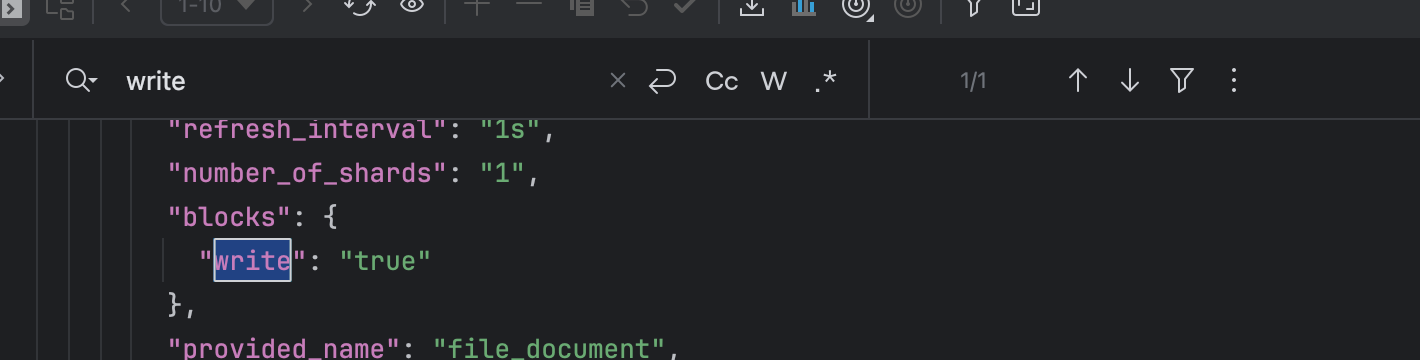
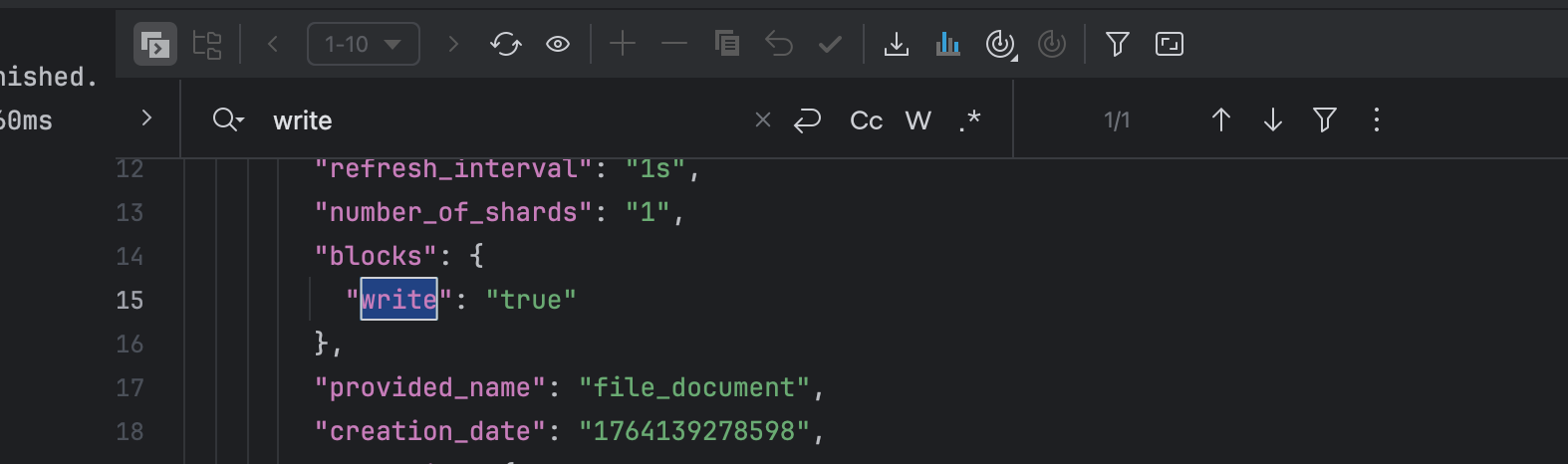
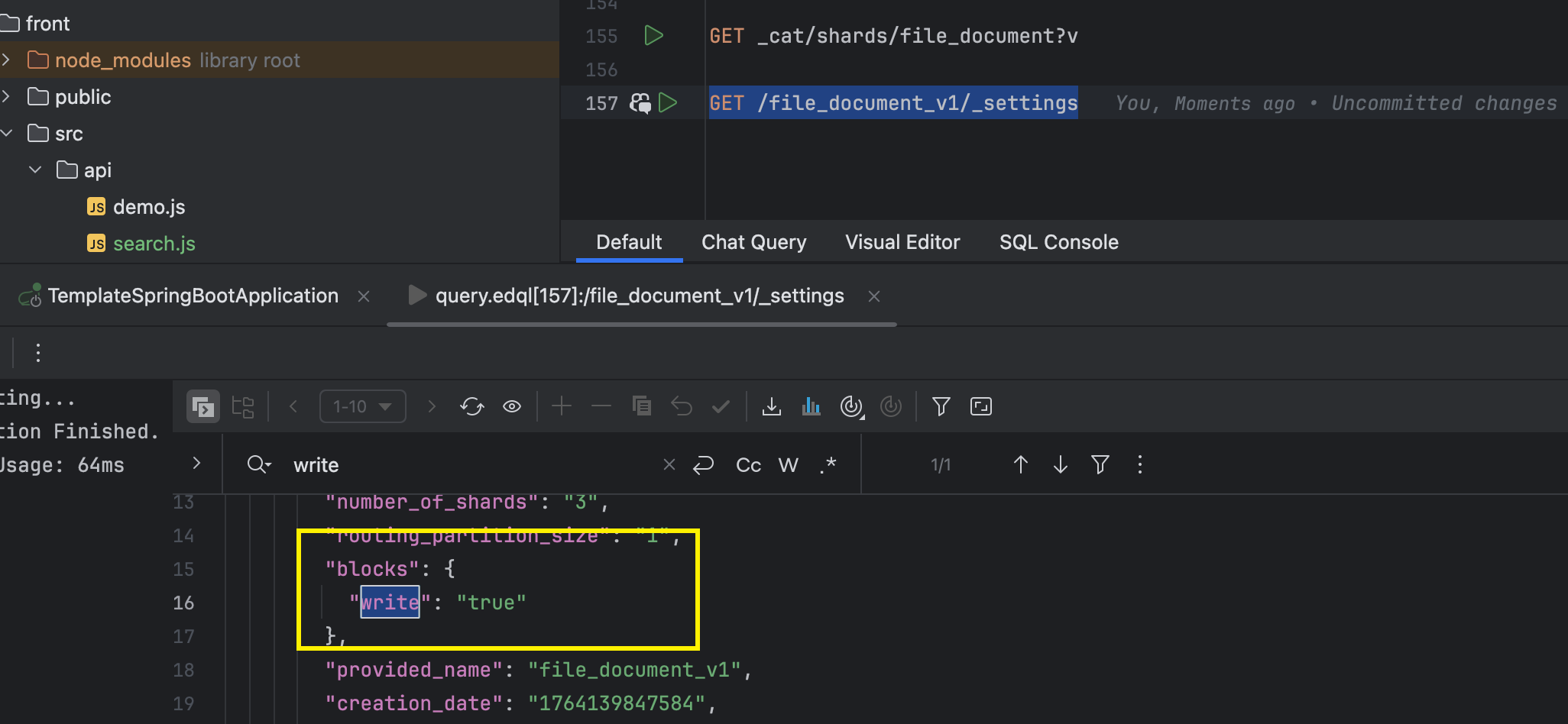
4.2、验证索引是否只读
GET /file_document/_settings
4.3、执行分片拆分(1→3个分片)
# file_document 切分为 file_document_v1 【file_document_v1为新版本】
POST /file_document/_split/file_document_v1
{
  "settings": {
    "index.number_of_shards": 3,
    "index.number_of_replicas": 1
  }
}
重要说明:
- 拆分操作需要满足:
目标分片数 % 原分片数 = 0 - 1→3 是允许的,因为 3 ÷ 1 = 3(整数倍)
- 拆分后的新索引 file_document_v1 会有3个主分片
查看新分片情况:
# 查看所有索引的分片信息(汇总)
GET _cat/indices/file_document_v1?v
# 查看索引的分片详情(单独某一个片,列举出来)
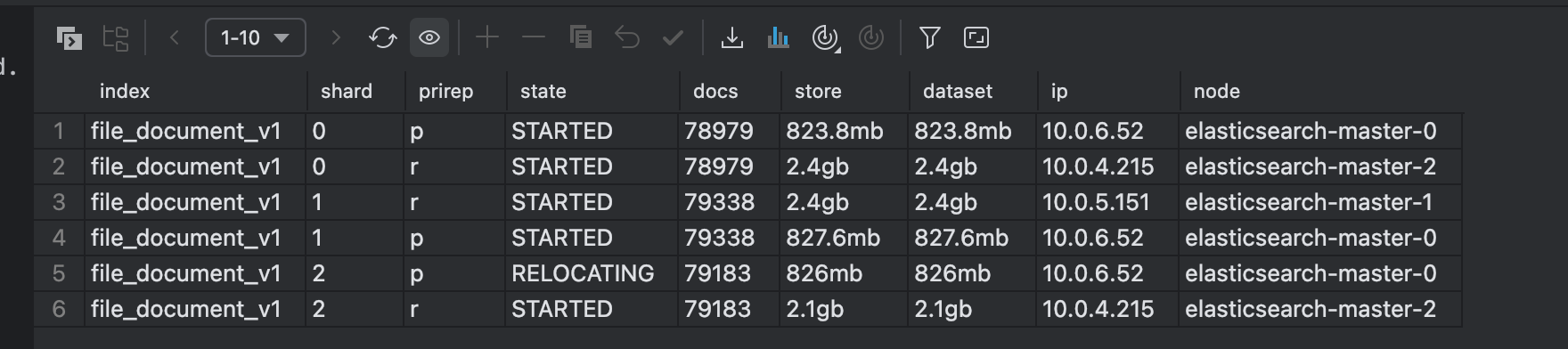
GET _cat/shards/file_document_v1?v
4.4、验证拆分是否完成
查看新分片情况:
# 查看所有索引的分片信息(汇总)
GET _cat/indices/file_document_v1?v
# 查看索引的分片详情(单独某一个片,列举出来)
GET _cat/shards/file_document_v1?v
/indices拆分过程中,状态可能是 yellow,完成后会变为 green:
health status index                     uuid                   pri rep docs.count docs.deleted store.size pri.store.size
yellow open   my_target_index_3shards   hijklmn789012345        3   1     600000            0      250mb        125mb
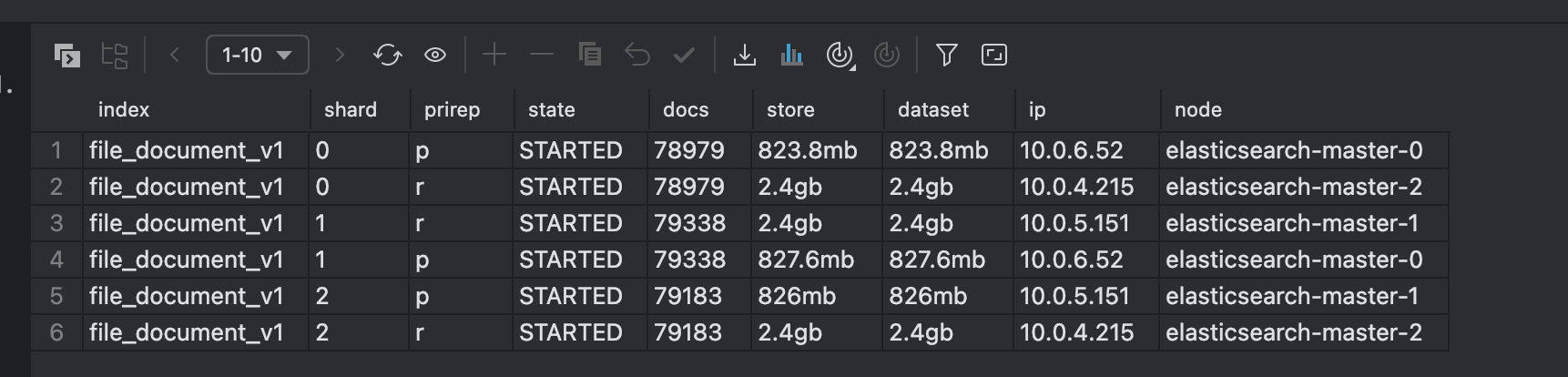
注意多个索引片的详情你要看**state状态,**需要等待全部变为started:
5、重新查看新索引的状态
GET /file_document_v1/_settings
重新打开写入:
PUT /file_document_v1/_settings
{
  "settings": {
    "index.blocks.write": null
  }
}
验证是否无误
6、切换别名到索引
# 移除原始 file_document 映射 my_search_file_document
# 新增file_document_v1 映射 my_search_file_document
POST /_aliases
{
  "actions": [
    {
      "remove": {
        "index": "file_document",
        "alias": "my_search_file_document"
      }
    },
    {
      "add": {
        "index": "file_document_v1",
        "alias": "my_search_file_document"
      }
    }
  ]
}
7、清除旧索引
DELETE /file_document
至此后续使用对应别名即可,即可自动完成映射:
GET /my_search_file_document/_search
{
  "query": {
    "match": {
      "fileContent": {
        "query": "管",
        "operator": "and",
        "minimum_should_match": "70%"
      }
    }
  },
  "from": 0,
  "size": 10,
  "_source": [
    "fileName",
    "createUserId",
    "fileSize",
    "updateTime",
    "filePath"
  ]
}
额外说明
提问问题:
切分拆分分片必须只有一个split切分吗?而且还要换索引,岂不是切换会导致double磁盘空间才可以 ,有没有可以直接对当前索引直接进行扩展分片呢 是否有api?
答案:
1、必须创建新索引,无法原地扩展吗?
是的,分片拆分必须创建新索引,这是 Elasticsearch 的设计限制。拆分过程中确实需要双倍磁盘空间,因为:
- 原索引数据保持不变
- 新索引创建并接收所有数据
- 只有在新索引完全可用后,才能删除旧索引
**2、**是否有直接扩展当前分片的 API?
没有。Elasticsearch 没有提供直接修改现有索引分片数量的 API。
为什么这样设计?
技术原因:
- 分片路由不可变:文档的分片位置由
hash(_id) % number_of_shards决定 - 数据分布固定:一旦索引创建,分片数量就决定了数据分布模式
- 保证数据一致性:避免在数据迁移过程中出现不一致
可替换方案:
| 方案 | 磁盘空间需求 | 停机时间 | 复杂度 | 适用场景 |
|---|---|---|---|---|
| 分片拆分 | 2倍 | 较短 | 中等 | 数据量大,需要保留历史数据 |
| 重建索引 | 2倍+ | 较长 | 高 | 需要修改映射或设置 |
| 滚动索引 | 1.x倍 | 几乎无 | 高 | 时间序列数据,可接受数据延迟 |
评论区请在客户端页面查看