文章目录
前言
本篇博客是介绍Fetch的使用,若文章中出现相关问题,请指出!
所有博客文件目录索引:博客目录索引(持续更新)
一、认识Fetch
1.1、介绍Fetch
Fetch也是前后端通信的一种方式。
优点:Fetch是Ajax(XMLHttpRequest)的一种替代方案,默认就是基于Promise。
如今不使用Fetch原因:①兼容性问题。②没有abort、timeout机制。③不能通过请求头来携带数据。(只能自己在url上加),还没有很完善所以还在使用ajax。
1.2、Fetch初次使用(查看response)
我们来看一下response的结果内容:
<script>
    const url = "https://www.imooc.com/api/http/search/suggest?word=ajax";  //后端对于application/json没有处理,只响应application/x-www-form-urlencoded的get请求

    console.log(fetch);

    // 发送请求
    fetch(url)
        .then(response => {
        console.log(response);
    }).catch(error => {
        console.log(error);
    })
</script>
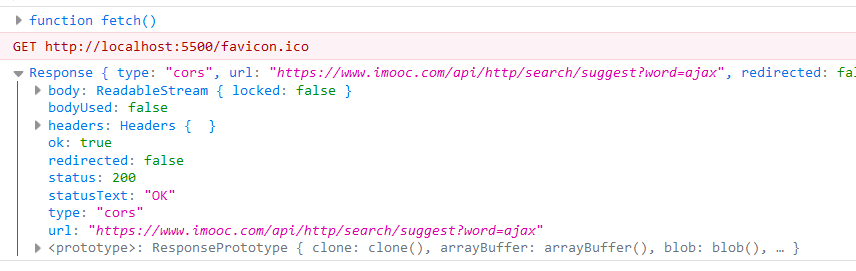
二、Fetch使用
2.1、使用Fetch()来得到响应数据(默认GET请求)
使用Fetch来发送请求响应数据:
data.json
{
    "code": 200,
    "data": {
        "name": "changlu",
        "age": 18
    }
}
index.html
<script>
    //传入url,默认为GET请求
    fetch('./data.json').then(function (response) {
        console.log(response);
        //若是ok为true,表示可以读取数据,就不需要去判断HTTP状态码了
        if (response.ok) {
            return response.json();//必须要通过调用json()方法得到一个Promise,紧接着继续执行then()方法就能够拿到响应数据
        }
    }).then(data => {  //拿到parse()后的对象
        console.log(data);
    }).catch(function (error) {
        console.log(error);
    });

</script>
注意:其中的response.json()只能调用一次,否则会报错!
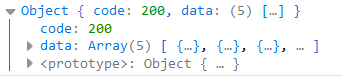
2.2、Fetch()中的第二个参数(配置fetch)
配置fetch内容是写在一个{}中的,写于第二个参数:
{
    body: JSON.stringify({username:'changlu'}) //body就是请求体,能够传递字符串以及FormData
    headers: { //请求头
        'Content-Type': 'applicaiton/json'  //这里还可以设置其他类型
    },
    mode: 'cors',//跨域
    credentials: 'include'  //跨域携带cookie
}
说明:
1、若是你设置指定的body为字符串时,可能是key=value&key1=value1或json字符串都要记得设置指定的Content-Type;若是传递FormData的话可以不设置,其默认会设置为
示例:测试FormData作为请求体
<script>
    // const url = "https://www.imooc.com/api/http/json/search/suggest?word=ajax";  //后端对于application/json处理过的接口
    const url = "https://www.imooc.com/api/http/search/suggest?word=ajax";  //后端对于application/json没有处理,只响应application/x-www-form-urlencoded的get请求

    console.log(fetch);

    // 发送请求
    const formdata = new FormData();
    formdata.append("username", "changlu");
    formdata.append("age", 18);
    // 发送请求
    fetch(url, {
        method: 'POST',
        body: formdata   //fetch默认会设置Content-Type: multipart/form-data;
    })
        .then(response => {
        if (response.ok) {
            return response.json();
        }
    }).then(response => {
        console.log(response);
    })
        .catch(error => {
        console.log(error);
    })
</script>

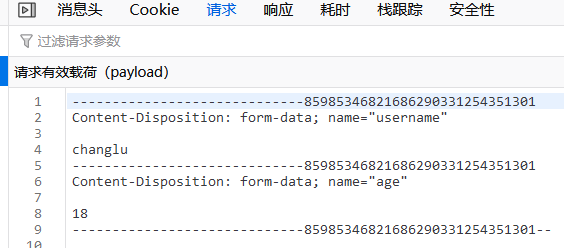
可以看到内容类型默认设置multpart/form-data,你可以进行额外其他设置。
整理者:长路 时间:2021.7.18
评论区请在客户端页面查看